
Ajaxtoolkit Calendar Extender close button and date restriction
ASP.NET AjaxToolkit Calendar extender is the most used control from AjaxControlToolkit. However, developers often give it up, because of some additional business requirements. Usually, ASP.NET developers replace it with standard ASP.NET calendar control and UpdatePanel. However, this is a very slow solution, so in this article, I’ll show you how you can modify AjaxlControlToolkit Calendar Control Extender, so it fits your needs, without touching AjaxControlToolkit source code.
Let’s build a simple sample of a Calendar extender:
<asp:ScriptManager ID="ScriptManager1" runat="server">
</asp:ScriptManager>

<table>
    <tr>
        <td>
            <asp:TextBox ID="txtDate" runat="server" Width="70"></asp:TextBox>
            <ajaxToolkit:CalendarExtender ID="ceCalendar" runat="server" PopupButtonID="ibtnCalendar" TargetControlID="txtDate">
            </ajaxToolkit:CalendarExtender>
        </td>
        <td>
            <asp:ImageButton ID="ibtnCalendar" ImageUrl="~/images/CalendarIcon.jpg" Width="20px" runat="server" />
        </td>
    </tr>
</table>
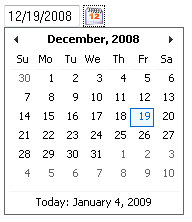
Close Button
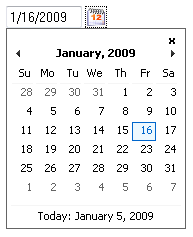
First of all, users always want a close button. At least twice I had to give up an AjaxControlToolkit Calendar control because it doesn’t have a close button. What if a customer, doesn’t want to pick a date, how they can close a calendar? I usually reply that you need to click outside of calendar control. Business guys said that this is not obvious. The calendar needs to have a close button, like a normal window! Let’s give them a close button.
To solve this problem we need a king of javascript, JQuery (now, recognized even by Microsoft).
<script src=“javascript/jquery-1.2.6.min.js” type=“text/javascript”></script>
    <asp:PlaceHolder runat=“server” Visible=“false”>
    <script src=“javascript/jquery-1.2.6.min-vsdoc.js” type=“text/javascript”></script>
</asp:PlaceHolder>
The first line includes jquery itself. Then I have PlaceHolder that doesn’t generate any code since it has a Visible attribute equal to false. This is a bulletproof way of enabling jquery IntelliSense.
Let’s put a little cross in the right top corner of the calendar control. If you inspect the Ajaxtoolkit calendar with FireBug you will see that it consists of div#ceCalendar_container and inside of two divs: div#ceCalendar_header and div#ceCalendar_body. So, we need to inject our little cross before those two div tags. After we add div with little x, we need to bind a handler which will close it on click.
<script type=“text/javascript”>

function GenerateCloseButton(sender, e) {
    if ($('#ajax__calendar_close_button').length == 0) {
        $(sender._header).before("<div id=‘ajax__calendar_close_button’>x</div>");
        $('#ajax__calendar_close_button').bind(“click”, sender, function(e) {
            e.data.hide();
        });
    }
}
</script>
My close button is just a little x, however, you can put any fancy image as a background image of div. Below is some basic CSS style for a close button.
<style type=“text/css”>
    #ajax__calendar_close_button
    {
        margin-right:5px;
        margin-left:auto;
        width:10px;
        font-weight:bold;
        cursor:pointer;
        text-align:right;
    }
</style>
Last step, you need to bind GenerateCloseButton function to some event in AjaxControlToolkit Calendar. OnClientShown is the best event for this purpose:
<ajaxToolkit:CalendarExtender ID=“ceCalendar” runat=“server”
    PopupButtonID=“ibtnCalendar”
    TargetControlID=“txtDate”
    OnClientShown=“GenerateCloseButton”>
</ajaxToolkit:CalendarExtender>
Date restrictions
Second, a most needed requirement is date restriction
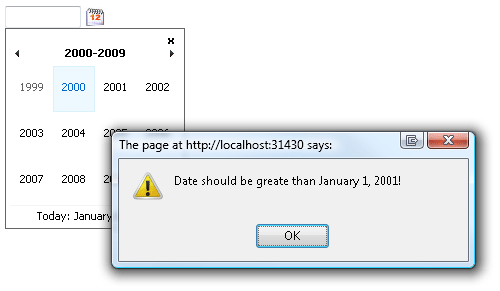
The simplest solution is to check a date in OnClientDateSelectionChanged event. However, at this point, you can’t stop a calendar from changing a selected date and hiding itself. You can try to do some hacks like clear the selected date and show the calendar again, but this is not what we are looking for. The calendar control should not hide if I selected the wrong date. It should not allow me to select a date at all. Let’s take a look at Ajaxtoolkit Calendar source code. We are not going to change it. We just take a look at its guts (AjaxControlToolkit source code). Let’s open CalendarBehavior.js. It’s easy to see that we need to intercept _cell_onclick event. Let’s write our own _cell_onclick (we also need to overwrite _button_onblur, so the calendar won’t hide, when you click ok in the alert window).
AjaxControlToolkit.CalendarBehavior.prototype._button_onblur_original = AjaxControlToolkit.CalendarBehavior.prototype._button_onblur;
AjaxControlToolkit.CalendarBehavior.prototype._button_onblur = function(e) {
    if (!this._selectedDateChanging)
    {
        this._button_onblur_original(e);
    }
}

AjaxControlToolkit.CalendarBehavior.prototype._cell_onclick_original = AjaxControlToolkit.CalendarBehavior.prototype._cell_onclick;
AjaxControlToolkit.CalendarBehavior.prototype._cell_onclick = function(e) {
    var target = e.target;
    var today_date = new Date();
    if (target.date.getFullYear() < 2001)
    {
        this._selectedDateChanging = true;
        alert(‘Date should be greate than January 1, 2001!');
        this._selectedDateChanging = false;
        return;
    }
    if (target.date > today_date)
    {
        this._selectedDateChanging = true;
        alert(‘You can't choose date in future.');
        this._selectedDateChanging = false;
        return;
    }
    this._cell_onclick_original(e);
}

 The easiest way is to create two different GenerateCloseButton javascript functions. For example, GenerateCloseButton1 and GenerateCloseButton2. Inside of each function replace ajax__calendar_close_button with ajax__calendar_close_button1 or ajax__calendar_close_button2 according to a function.


