
XRefresh alternative solution
I am using two monitors for web development for the past 4 years. Usually, I have a website that I am working on a left monitor and my Visual Studio on a right monitor. I do change in Visual Studio then press Shift-F6 (in case of code change) or just Ctrl-S (to save). After that, I grab a mouse, move a cursor to the browser on the left monitor click and then F5 for the refresh. If you do little CSS tweaks it is too many repetitive movements.
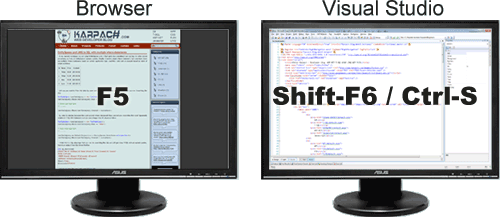
About two years ago I discovered XRefresh. I mentioned it in my ASP.NET development tips article. First I was really excited. It is an excellent tool for HTML and CSS markup tweaking. But if you do a lot of code changes and need to recompile your project more often than markup tweaking then it might not be the best tool for you. XRefresh watches files. If a file changes then it refreshes the browser. Now imagine if you compile a big project and compilation takes 15 sec. XRefresh would notice dll change and would try to refresh the browser. However, the compilation is not done yet and some dll-s are locked. So, XRefresh most likely not going to work for Shift-F6 scenario (recompilation of project). This was quite annoying as you can imagine, so I thought there must be some way to come up with a solution. We may have read all the hardware and O2 uk broadband reviews possible, but if your screen is not refreshing properly that can be very inconvenient.
So, I found XRefresh alternative solution. I wrote a Visual Studio macros. You can hook up to OnBuildDone event. Then find Firefox process. Move focus to the Firefox window and send F5 keystroke to it. The macros below still needs some polishing, but you can get an idea:
Private Sub BuildEvents_OnBuildDone(ByVal Scope As EnvDTE.vsBuildScope, _
    ByVal Action As EnvDTE.vsBuildAction) Handles BuildEvents.OnBuildDone
    Dim projects As Object() = DTE.ActiveSolutionProjects
    If projects.Length > 0 Then
        If CType(projects(0), Project).ExtenderNames.Length Then
            If CType(projects(0), Project).ExtenderNames(0) = "WebApplication" Then
                Dim proc As System.Diagnostics.Process() = _
                            System.Diagnostics.Process.GetProcessesByName("firefox")
                For i As Integer = 0 To proc.Length - 1
                    If proc(i).MainWindowHandle <> 0 Then
                        SetForegroundWindow(New HandleRef(Nothing, proc(i).MainWindowHandle))
                        System.Windows.Forms.SendKeys.SendWait("{F5}")
                    End If
                Next
            End If
        End If
    End If
End Sub
I am open to discussions and any suggestions.

 I know about filtering capabilities. What is “build finish report”?